5 Best Open Source Accounting Software for Small Business 2026
If you are running a wholesale business in Surat or a small manufacturing unit in Pune, the last thing you want to worry about is your software license expiring or your data getting locked behind a paywall. You have shipments to manage, GST returns to file, and vendors calling you for payments.
I talk to business owners like you every single day. Most of the time, the conversation starts with frustration. You might say to me, “Look, I just need a system that tracks my inventory and tells me if I am making a profit or not. Why does it have to be so expensive and complicated?”
That is exactly why we are going to talk about open source accounting software today.
It is 2026, and the digital landscape in India has changed. You do not always need to buy the big expensive brand names to run a successful business. Sometimes, the community-driven, flexible, and free (or low cost) options are actually better for the specific way you do business.
So grab a cup of tea/coffee and let me walk you through this. I am going to explain this just like I would if we were sitting in your office right now.
First, What Actually Is Open Source?
Before we jump into the list, I need to make sure we are on the same page. When I say “open source,” a lot of people just hear “free software.” While that is often true, it means something much more important for a business owner.
Think of it like a recipe for Butter Chicken.
Closed Source Software is like ordering Butter Chicken from a restaurant. You get what they give you. You cannot change the ingredients. If they raise the price, you have to pay it. If they stop making it, you go hungry.
Open Source Software is like having your grandmother’s secret recipe for Butter Chicken. It is free to use. But more importantly, if you want to add more spice, you can. If you want to make a huge batch for a party, you can. You own the method. You have control.
For a trader or manufacturer, this control is power. It means your data belongs to you, and you can customize the software to fit your warehouse workflow perfectly.
Why Indian SMEs Are Switching to Open Source in 2026
I have noticed a massive shift in the last few years. It used to be that everyone just bought Tally and moved on. But now, with complex GST requirements and the need for better inventory management, people are looking for alternatives.
Here is why your competitors might be looking at best open source accounting software in India:
- Cost Efficiency: You save on heavy licensing fees. You might pay for hosting or support, but you do not pay just to “use” the software.
- Customization: If you are a textile wholesaler, you need specific fields for fabric type or meters. Open source lets you add that. Closed software usually does not.
- Data Privacy: Your financial data stays on your server or your private cloud. No big tech company is peeking at your sales data.
However, though Open source software is powerful, it is not always the best “plug and play.” It often requires a bit of technical know-how to set up. If you are not tech-savvy, you might need to hire a local IT vendor to install it for you. Think of it as buying a car kit instead of a finished car. It is cheaper and faster, but someone has to assemble it.
With that said, let us look at the top 5 contenders for open source accounting software for small business in India for 2026.
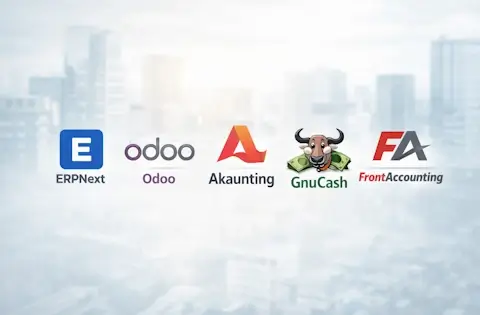
The 5 Best Open Source Accounting Software for India 2026
1. ERPNext: The Indian Powerhouse
If I had to pick one heavy hitter for an Indian manufacturer or distributor, this is it. ERPNext is actually built in India (by a company called Frappe based in Mumbai), which means they understand our local problems better than anyone else.
Why it fits you:
Imagine you run a furniture manufacturing unit. You need to buy wood (raw material), track the labor, manage the warehouse where finished chairs are kept, and then bill the retailer with proper GST.
ERPNext handles all of this. It is not just accounting software; it is an ERP (Enterprise Resource Planning) system. It connects your buying, selling, stock, and accounting in one place.
The “Indian” Advantage:
Because it is Indian-origin, the GST accounting software open source features are excellent. It handles GSTR-1, GSTR-3B reports, and e-invoicing natively. You do not have to struggle with plugins that barely work.
Real World Example:
I have a client who runs a chemical trading business. He used to have one software for inventory and another for billing. It was a mess. We moved him to ERPNext. Now, when he raises a Sales Invoice, the inventory automatically reduces, the GST is calculated based on the HSN code, and the ledger is updated. All instantly.
Key Features:
- Full double-entry accounting.
- Excellent Inventory Management (Batch numbers, serial numbers).
- Buying and Selling modules.
- HR and Payroll included.
Is it free?
The software code is 100 percent open source and free. You can download it and host it yourself. If you want them to host it for you, they charge a fee.
Where to find it: https://erpnext.com
2. Odoo (Community Edition): The Modular Giant
You have probably heard of Odoo. It is one of the most popular business software suites in the world. They have two versions: Enterprise (paid) and Community (Open Source). We are talking about the Community version here.
Why it fits you:
Odoo works like building blocks. You start with just the Accounting block. Later, if you want to add a website or a CRM (Customer Relationship Management) to track your leads, you just “install” that block.
For a wholesale distributor who has sales guys running around the city taking orders, Odoo is fantastic because it has a mobile-friendly interface.
The Catch:
I have to be honest with you. The “pure” free version of Odoo Accounting in the Community edition is a bit limited compared to the paid version. However, because it is open source, there is a massive community in India that has built free “add-ons” to make the Community version fully GST compliant.
Real World Example:
Think of a garment distributor. They have seasonal sales. During Diwali, they need a Point of Sale (POS) system for their showroom. With Odoo, they just turn on the POS module. When the season is over, they focus back on the backend inventory. It grows with you.
Key Features:
- Beautiful, modern user interface.
- Thousands of free third-party apps.
- Strong inventory management.
- Great for businesses that want to sell online later.
Where to find it: https://www.odoo.com/page/community
3. Akaunting: The Modern Cloud Challenger
If you are a service provider, a freelancer, or a very small trading business, ERPNext or Odoo might feel like buying a bus when you only need a scooter. That is where Akaunting comes in.
Why it fits you:
Akaunting is designed to look and feel like modern cloud-based accounting software (like Quickbooks or Xero), but it is open source. It is web-based, which means you can access it from your phone or laptop anywhere.
Simplicity is Key:
It does not complicate things. It has a dashboard that shows: Money In, Money Out, and Cash Balance. For a small trader who just wants to send professional invoices and track expenses, this is perfect.
GST Compliance:
There are apps within the Akaunting marketplace specifically for Indian GST. You might have to pay a small one-time fee for the specific GST plugin, but the core software is free.
Real World Example:
I know a graphic design agency with 5 employees. They do not have “inventory.” They just send bills. So they use Akaunting because it is simple, they can host it on their own server for cheap, and it looks professional when they send an invoice to a client.
Key Features:
- Very easy to use (no training needed).
- Client Portal (your clients can log in to see their invoices).
- Multi-currency support (good for exporters).
- Expense tracking.
Where to find it: https://akaunting.com
4. GnuCash: The Old Reliable for Micro-Businesses
Now we are going back to basics. GnuCash is not a fancy web app. It is software you download and install on your computer, just like you used to install games in the early 2000s.
Why it fits you:
If you are a strict, disciplined accountant or a small shop owner who understands double-entry bookkeeping, you will love this. It is fast. It does not need the internet and it never asks for a subscription.
The Trade-off:
It is not “pretty.” It looks like a spreadsheet on steroids. It does not have built-in GST auto-filing features. You will have to set up your GST tax rates manually. But once you set it up, it is bulletproof.
Real World Example:
My Friend runs a small hardware consultancy. He generates maybe 10 invoices a month. Also, he does not want his data on the cloud. So he uses GnuCash and he manually enters his sales and expenses. At the end of the year, he exports the report for his CA. It costs him zero rupees and zero headaches.
Key Features:
- Works offline (Desktop based).
- Very low system requirements (works on old computers).
- Handles multiple currencies.
- Excellent reporting (Balance Sheet, P&L).
Where to find it: https://www.gnucash.org
5. FrontAccounting: The Warehouse Warrior
This one is a hidden gem for wholesalers. FrontAccounting is not famous for looking good. In fact, it looks quite dated. But under the hood, it is a beast for managing inventory and general ledgers.
Why it fits you:
If you run a distribution business where you have thousands of items (SKUs) and you need to track them across different locations, FrontAccounting is very capable. It is web-based but very lightweight.
For the Indian Market:
It has a very flexible tax system which can be configured for GST. It is popular among tech-savvy traders who want a system that is fast and does not use much data bandwidth.
Real World Example:
Imagine an auto-parts distributor. They have parts for Tata, Maruti, Hyundai—thousands of small items. They need a system that loads fast even on a slow internet connection in a godown. FrontAccounting works perfectly there because it is text-heavy and simple.
Key Features:
- Multi-location inventory.
- Sales Orders and Purchase Orders.
- Manufacturing (Bill of Materials).
- Allocations and Dimensions (for advanced tracking).
Where to find it: https://frontaccounting.com
Quick Comparison Table for the Busy Business Owner
I know you are busy, so here is a quick snapshot to help you decide which open source accounting software fits your business model.
| Software Name | Best For | Difficulty Level | GST Readiness | Hosting Type |
|---|---|---|---|---|
| ERPNext | Manufacturers & Large Traders | Medium | High (Native) | Web/Cloud |
| Odoo (Comm) | Growing businesses requiring apps | Medium/Hard | Medium (Needs setup) | Web/Cloud |
| Akaunting | Service providers & Small Traders | Easy | Medium (Plugin) | Web/Cloud |
| GnuCash | Micro-businesses & Freelancers | Medium (Accounting knowledge needed) | Low (Manual setup) | Desktop (Offline) |
| FrontAccounting | Wholesalers with heavy stock | Medium | Medium (Configurable) | Web/Cloud |
How to Actually Implement This?
Okay, you have picked a software from the list. Now what? You cannot just snap your fingers and expect your accounts to manage themselves. Here is the advice I give my paying clients when they want to switch to open source.
1. Don’t Do It Alone (Unless You Are a Geek)
If your business turnover is significant, do not try to install ERPNext or Odoo on a server by yourself unless you know Linux. Hire a local freelance developer or a small IT agency. The money you save on licenses can be used to pay them for support. This ensures your best open source accounting software in India actually runs smoothly.
2. The “Parallel Run” Rule
Never switch software overnight. If you are using Tally or Excel right now, keep using it for one month while you also enter data into the new open source system. We call this a “Parallel Run.” It helps you catch errors before you fully switch over.
3. Hosting Matters
For the web-based options (ERPNext, Odoo, Akaunting), you need a place to host them. You can use a local server in your office, but I recommend a small cloud VPS (Virtual Private Server). It costs roughly ₹500 to ₹1000 per month. This ensures your data is safe even if your office computer crashes.
4. Train Your Accountant
This is where most projects fail. Your accountant is used to Tally. They know the shortcuts by heart. When you put a web-based system in front of them, they will resist. Sit with them. Show them how this new system makes their life easier (like auto-emailing invoices or auto-inventory updates). If you are looking into AI-powered accounting software features in the future, getting them comfortable with web interfaces now is the first step.
A Note on “Free” vs “Cost of Ownership”
I want to circle back to the cost. Yes, the software license is free. But please remember that “Free” is like a free puppy. It still needs food and care.
In the world of open source, your costs will shift:
- Old Way: You pay ₹20,000 per year for a license.
- Open Source Way: You pay ₹0 for license, but maybe ₹5,000 for server hosting and ₹5,000 to an IT guy to update it once in a while.
You still save money, but more importantly, you own the system. If the software company shuts down tomorrow, your software keeps running because you have the source code. That security is priceless for a serious SME.
Frequently Asked Questions
Q: Is open source accounting software safe for my financial data?
A: Yes, it can be very safe, often safer than closed software because you control where the data is stored. However, security depends on how you host it. If you host it on a secure server with strong passwords and backups, it is very secure.
Q: Can these software handle Indian GST filing directly?
A: ERPNext has native support for GST filing (JSON export for GSTR-1). Odoo and others usually require third-party plugins or community modules to handle Indian GST formats effectively.
Q: Do I need internet to use these software?
A: ERPNext, Odoo, Akaunting, and FrontAccounting are web-based, so they work best with the internet, but you can install them on a local office server (LAN) to use them without the internet within your office. GnuCash is a desktop app and does not need the internet at all.
Q: Can I migrate my data from Tally to open source software?
A: Yes, but it is not automatic. Most open source software allows you to import data using Excel or CSV files. You will likely need to export your Masters (Ledgers, Items) from Tally into Excel, format them, and import them into the new system.
Q: Is open source support available if something breaks?
A: There is no “customer care” number for the free versions. Support comes from community forums, user guides, or by hiring a professional developer/consultant who specializes in that specific software.
Conclusion
Choosing the best open source accounting software in India is about understanding your own business size and complexity.
- If you are a Manufacturer, go for ERPNext. It handles the complexity of raw materials beautifully.
- If you are a Trader/Wholesaler, Odoo or FrontAccounting are strong contenders depending on how modern you want the interface to be.
- If you are a Service Provider, Akaunting is your best bet.
- If you are a Solopreneur, stick to GnuCash.
The year 2026 is the time to take control of your financial data. You do not need to be a large corporation to have world-class software anymore. You just need the courage to try something different.
If you are unsure, download one of these this weekend. Play with it. Enter five invoices. See how it feels. That is the beauty of open source—it costs you nothing to try.
Also while these software options are excellent, tax laws in India change frequently. Always consult with your Chartered Accountant (CA) or a certified IT vendor before completely switching your financial systems to ensure compliance with the latest regulations.
Good luck with your business, and may your balance sheet always be green!
Related Resources:
Top 5 Cloud-Enabled Accounting Software in India (Hybrid Tools)
What is Accounting: Meaning, Types & Why It Matters
What is an Accounting System? Accounting Components, Types and Examples
8 Best Cloud-Based Accounting Packages for Indian SMEs (2026)
The 5 Best AI Accounting Software for Small Business
Top 13 Financial Accounting Software for Indian Businesses 2026
Top Free Accounting Software Options for India GST
The CAs Tech Stack: 5 Best Accounting Software for CA Firms in India 2026